

Glorify · User-contributed screenshot · resized, content unchanged
Other readers’ notes inside the text
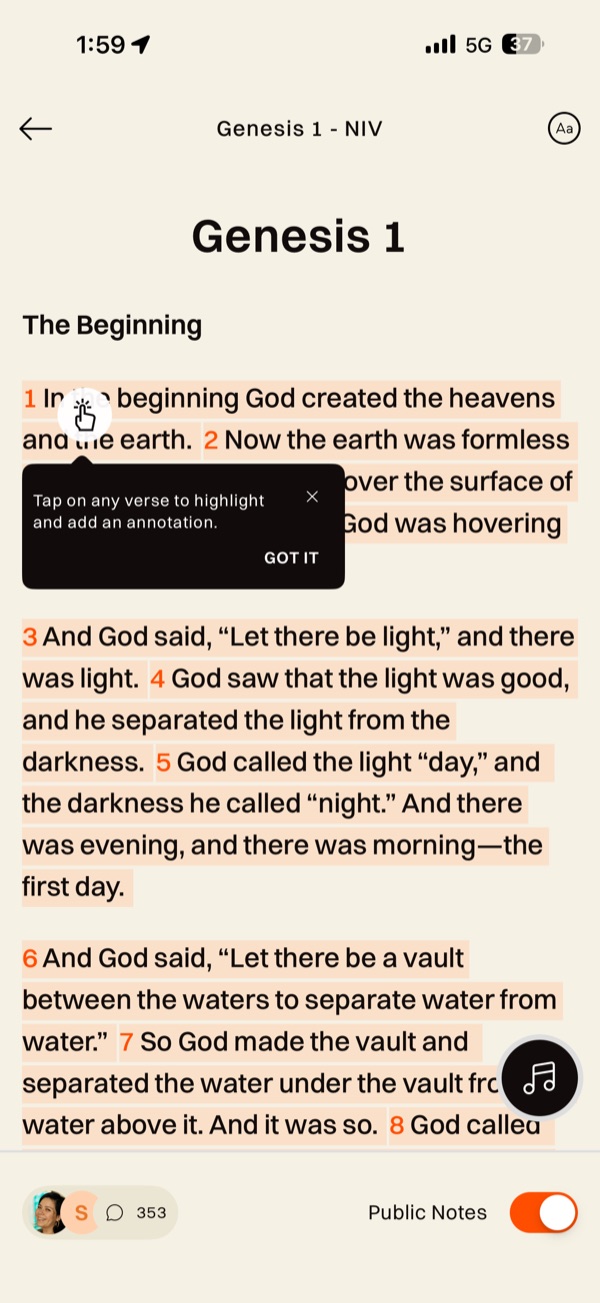
Genesis 1 (NIV) opens with verses tinted where other readers have left notes and a coach mark: “Tap on any verse to highlight and add an annotation.” A bar at the bottom shows small avatars, a speech bubble with 353, and a “Public Notes” switch turned on. With the switch off, the same text appears clean.
Observed in Glorify: app profile, research screenshots and design review.
Design takeaway
Showing others’ notes inside Scripture turns reading into a conversation, and puts unvetted voices in the text. A switch helps; say whose notes they are, how they are moderated, and make the default a deliberate choice.
What this example establishes
Genesis 1 (NIV) opens with verses tinted where other readers have left notes and a coach mark: “Tap on any verse to highlight and add an annotation.” A bar at the bottom shows small avatars, a speech bubble with 353, and a “Public Notes” switch turned on. With the switch off, the same text appears clean.
Limits and further verification
A still image shows one interface state. Gestures, timing, accessibility, persistence and what happens next were not tested. App version not recorded.
Provenance
- Platform
- iOS app · device model not recorded
- Image origin
- User-contributed screenshot · resized, content unchanged
- Source or capture date
- Captured 28 August 2025 · from embedded image metadata
- Reviewed
- 6 October 2026
- Version
- Not recorded
Screenshot captured by Tobias Treppmann for his app-pattern research and supplied for this design reference. Resized for the web; content unchanged. Interface, imagery and Scripture text remain the property of their respective rights holders.
Compare the relevant patterns
Keep my note distinct from a shared comment
Origin, audience and anchor belong to the note—not just its screen.
Editorial design proposal32 · Study and annotationsThe annotation anchor is explicit
Make exact wording and reference-based notes different personal objects.
Research-informed design proposal