

Joseph Prince · User-contributed screenshot · resized, content unchanged
A study layer you can switch off
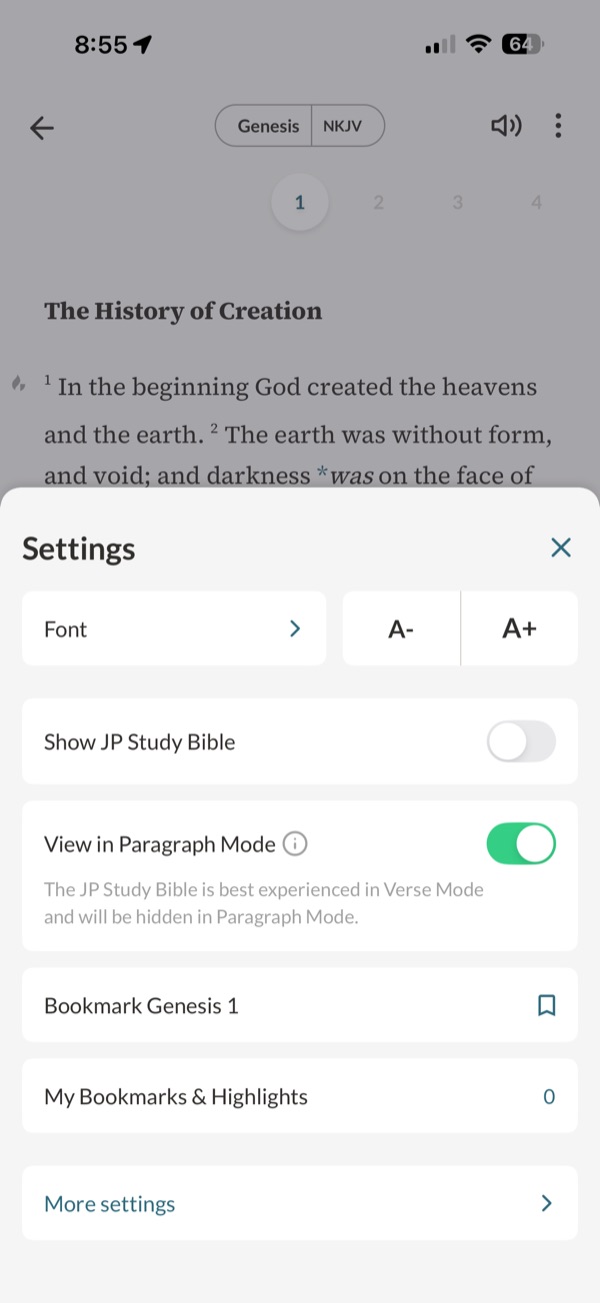
The reader’s Settings sheet shows Font and text size, “Show JP Study Bible” switched off and “View in Paragraph Mode” switched on, with the caption “The JP Study Bible is best experienced in Verse Mode and will be hidden in Paragraph Mode.”
Design takeaway
Making the study layer switchable keeps the plain text available. Coupling it to verse mode is a design choice worth stating, as here.
What this example establishes
The reader’s Settings sheet shows Font and text size, “Show JP Study Bible” switched off and “View in Paragraph Mode” switched on, with the caption “The JP Study Bible is best experienced in Verse Mode and will be hidden in Paragraph Mode.”
Limits and further verification
A still image shows one interface state. Gestures, timing, accessibility, persistence and what happens next were not tested. App version not recorded.
Provenance
- Platform
- iOS app · device model not recorded
- Image origin
- User-contributed screenshot · resized, content unchanged
- Source or capture date
- Captured 22 October 2025 · from embedded image metadata
- Reviewed
- 6 October 2026
- Version
- Not recorded
Screenshot captured by Tobias Treppmann for his app-pattern research and supplied for this design reference. Resized for the web; content unchanged. Interface, imagery and Scripture text remain the property of their respective rights holders.