

Speaker colors within the passage
SourceView · 25 October 2026 · Version 1.3.1
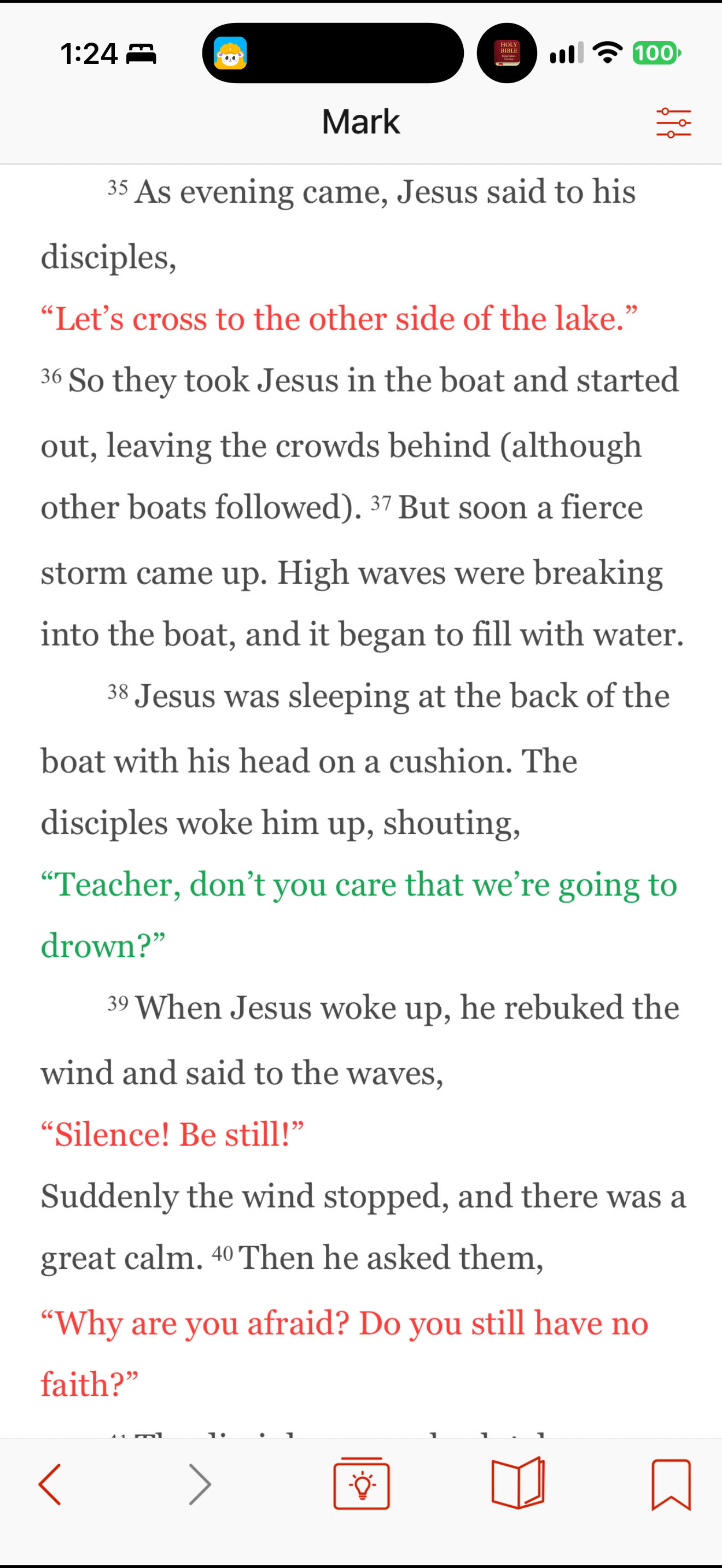
What this shows
SourceView displays spoken lines in red and green within the paragraph text of Mark 4.
Capture context
The publisher describes source-role color coding. These displayed colors are not personal highlights. This frame does not establish a comprehension benefit or verify every speaker attribution.
Captured for interface research. Screen behavior may change between app versions.
Selected text visible in this screen
Interface labels transcribed during review.
Mark; 35; 36; 37; 38; 39; 40.
Patterns about this screen
The design decisions this screen shows, with the options and research behind each.
- Numbers, headings and notes
How much should surround the text? · Reading the Bible
- Whose theology
When Christians disagree, whose teaching does the assistant follow? · Talking with AI
Explore this screen
- Screen type
- Bible reader
- Components
- Navigation barIcon buttonText content
- Patterns / features
- Editorial cuesReading layout
- User tasks
- Read Scripture
- Interface states
- Not specified
Component details
Navigation bar · Icon button · Inline text styling
Original descriptive labels
Browsing uses consistent groups. The original reviewed labels stay searchable; they can describe settings, context or capture details rather than a user task or interface state.
- Screen description
- Bible reader
- Task descriptions
- Read Scripture
- State and context descriptions
- Default
- Feature descriptions
- Speaker colors · Verse numbers · Reading layout