

Reader styles
Dwell · 24 October 2026 · Version 2026.10.1
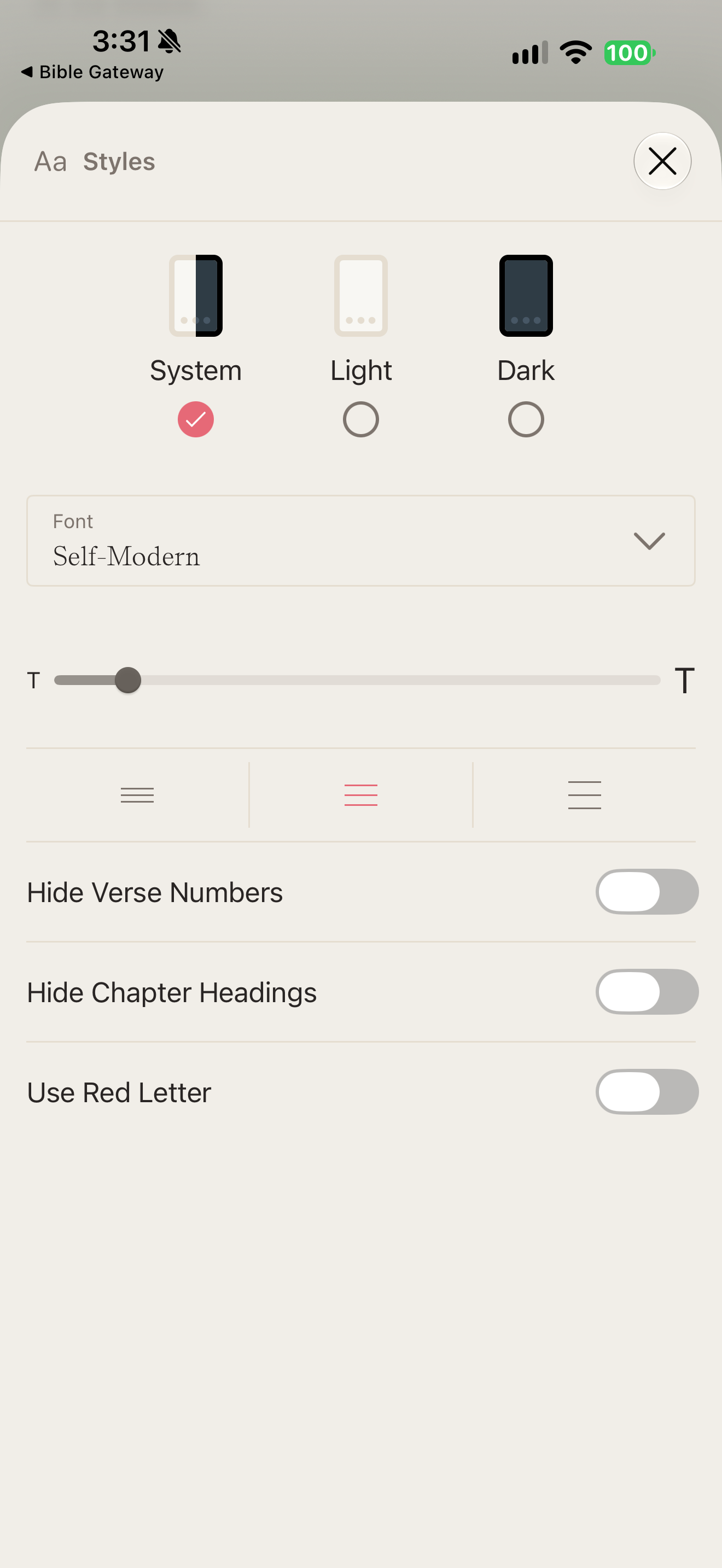
What this shows
Styles sheet offers theme, font, size, spacing and structural text toggles.
Capture context
Publisher content in the captured screen; no complete flow or outcome is implied.
Captured for interface research. Screen behavior may change between app versions.
Selected text visible in this screen
Interface labels transcribed during review.
Styles; System; Light; Dark; Font; Self-Modern; Hide Verse Numbers; Hide Chapter Headings; Use Red Letter
Patterns about this screen
The design decisions this screen shows, with the options and research behind each.
- How much text at once
One word, a verse, a passage or a whole chapter? · Reading the Bible
- Numbers, headings and notes
How much should surround the text? · Reading the Bible
Explore this screen
- Screen type
- Settings
- Components
- Radio controlMenuSliderSelectorToggle
- Patterns / features
- Not specified
- User tasks
- Manage settings
- Interface states
- Not specified
Component details
Theme radios · Font menu · Size slider · Spacing choices · Toggles
Original descriptive labels
Browsing uses consistent groups. The original reviewed labels stay searchable; they can describe settings, context or capture details rather than a user task or interface state.
- Screen description
- Settings
- Task descriptions
- Manage reading
- State and context descriptions
- Default
- Feature descriptions
- Not recorded