

screen:shot-98a0af1297dfb65b2591screencom.yourcompany.TecartaBibleAnnotation editorColor pickerText selectionBottom sheetMark & saveStudy a passageSelectedAll screenshots 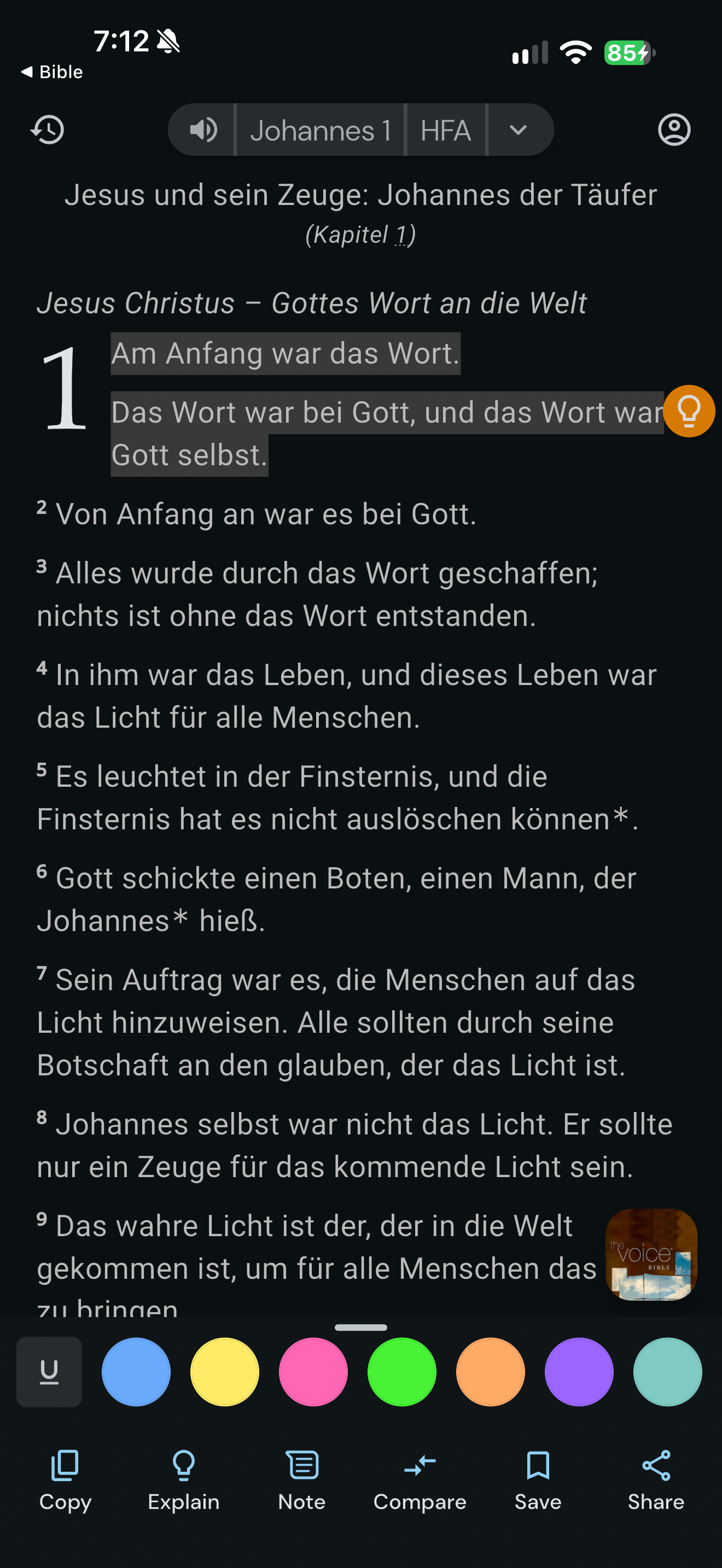
App interface screenshot · Life Bible. Original pixels preserved.
Selected verse actions
Life Bible · 14 October 2026 · Version
What this shows
Life Bible opens color and underline options plus copy, explain, note, compare, save and share actions for John 1:1.
Capture context
Retained capture; only the visible state is evidenced.
Captured for interface research. Screen behavior may change between app versions.
Selected text visible in this screen
Interface labels transcribed during review.
Johannes 1; HFA; Copy; Explain; Note; Compare; Save; Share
Patterns about this screen
The design decisions this screen shows, with the options and research behind each.
- Highlights and notes
How should readers mark a passage? · Reading the Bible
Explore this screen
- Screen type
- Annotation editor
- Components
- Color pickerText selectionBottom sheet
- Patterns / features
- Not specified
- User tasks
- Mark & saveStudy a passage
- Interface states
- Selected
Component details
Color picker · Text selection · Bottom sheet
Original descriptive labels
Browsing uses consistent groups. The original reviewed labels stay searchable; they can describe settings, context or capture details rather than a user task or interface state.
- Screen description
- Annotation editor
- Task descriptions
- Mark and save · Study a passage
- State and context descriptions
- Selected
- Feature descriptions
- Not recorded