

Saving Scripture from a verse selection
Prayminder · 13 October 2026 · Version 1.5.1
What this shows
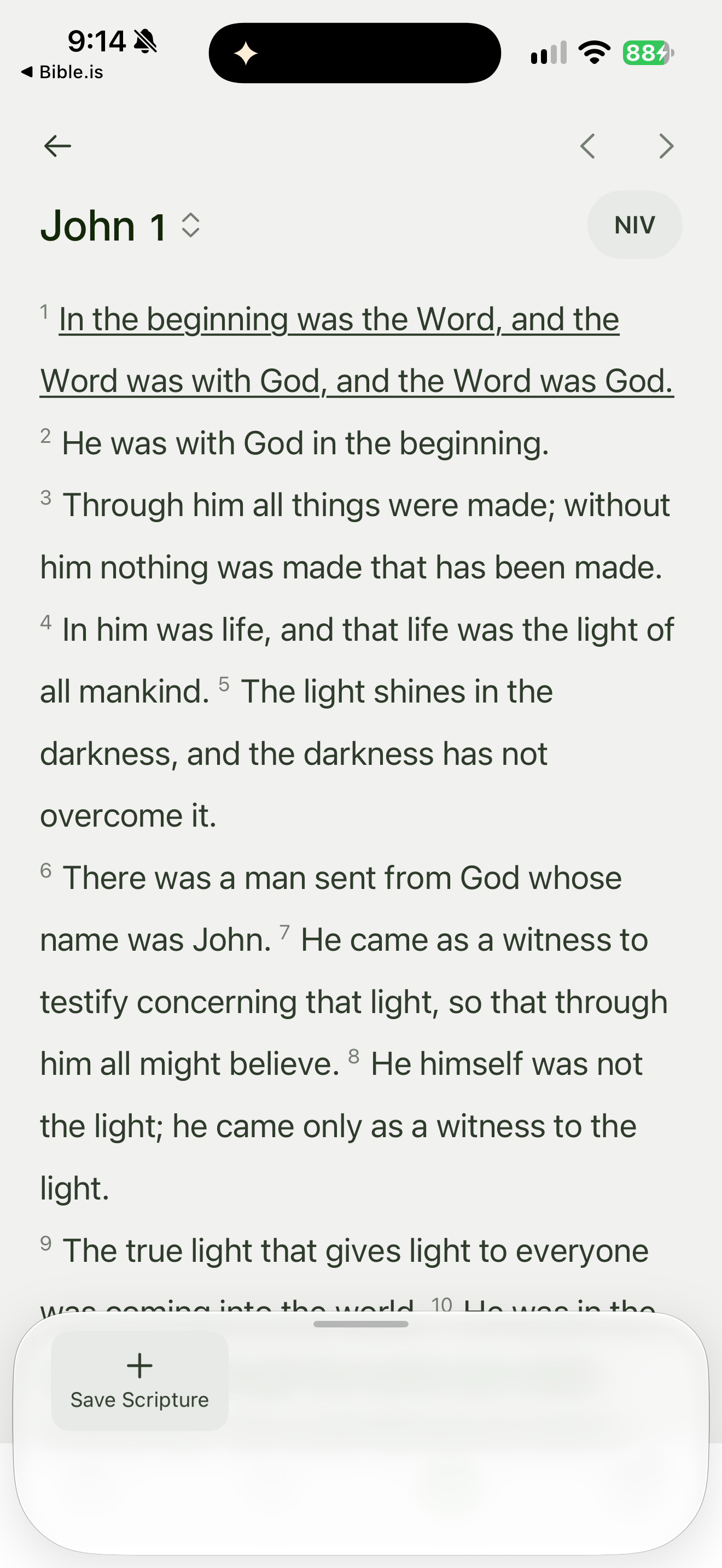
Prayminder underlines John 1:1 and exposes a Save Scripture action.
Capture context
A selected verse and save action only; no saved prayer or destination is shown.
Captured for interface research. Screen behavior may change between app versions.
Selected text visible in this screen
Interface labels transcribed during review.
John 1; NIV; In the beginning was the Word, and the Word was with God, and the Word was God.; Save Scripture.
Patterns about this screen
The design decisions this screen shows, with the options and research behind each.
- Prayer
How can an app make room for prayer? · Prayer and practice
- Highlights and notes
How should readers mark a passage? · Reading the Bible
Explore this screen
- Screen type
- Bible reader
- Components
- Bottom sheetText selectionButton
- Patterns / features
- Not specified
- User tasks
- Read ScriptureMark & savePray & reflect
- Interface states
- Selected
Component details
Bottom sheet · Text selection · Primary button
Original descriptive labels
Browsing uses consistent groups. The original reviewed labels stay searchable; they can describe settings, context or capture details rather than a user task or interface state.
- Screen description
- Bible reader
- Task descriptions
- Read Scripture · Mark and save · Pray
- State and context descriptions
- Selected
- Feature descriptions
- Not recorded