

Olive Tree Bible · User-contributed screenshot · resized, content unchanged
A second translation synced in a split screen
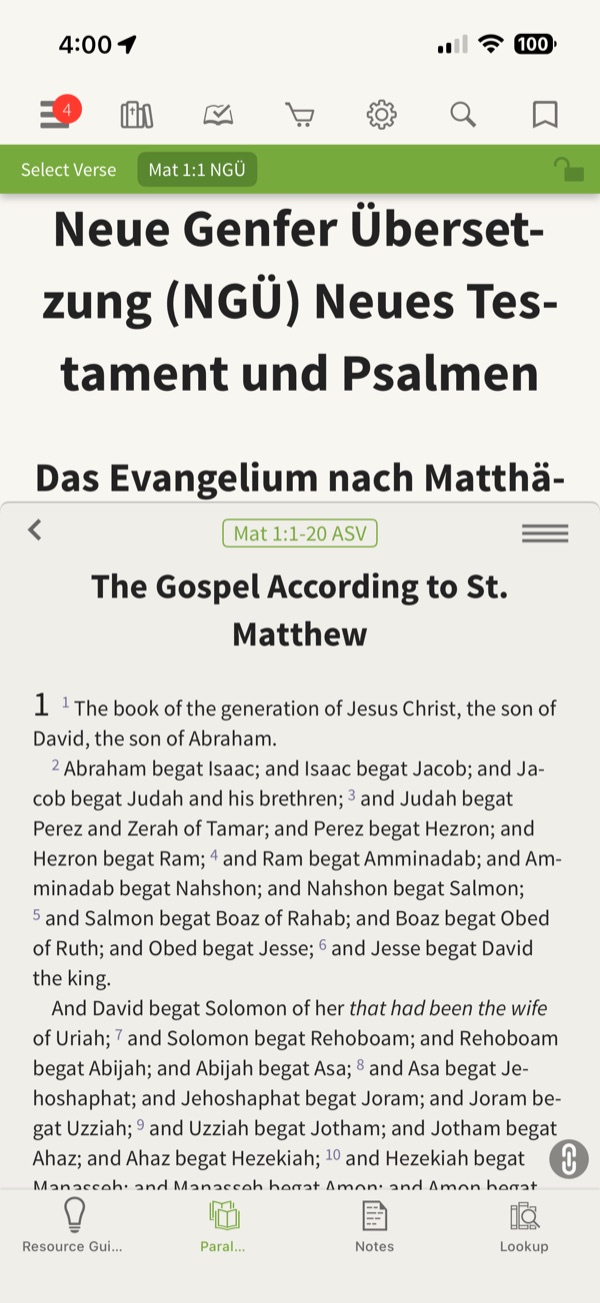
The upper pane shows the Neue Genfer Übersetzung (German) at Matthew 1:1 with a “Select Verse · Mat 1:1 NGÜ” bar. The lower pane, opened from the Parallel tab, shows the American Standard Version at “Mat 1:1-20 ASV” with a link icon in the corner.
Observed in Olive Tree Bible: app profile, research screenshots and design review.
Design takeaway
A linked split screen keeps two translations, even in two languages, on the same passage. Show the link state in words as well as the icon, and give a way to realign after scrolling one pane.
What this example establishes
The upper pane shows the Neue Genfer Übersetzung (German) at Matthew 1:1 with a “Select Verse · Mat 1:1 NGÜ” bar. The lower pane, opened from the Parallel tab, shows the American Standard Version at “Mat 1:1-20 ASV” with a link icon in the corner.
Limits and further verification
A still image shows one interface state. Gestures, timing, accessibility, persistence and what happens next were not tested. App version not recorded.
Provenance
- Platform
- iOS app · device model not recorded
- Image origin
- User-contributed screenshot · resized, content unchanged
- Source or capture date
- Captured 22 September 2025 · from embedded image metadata
- Reviewed
- 6 October 2026
- Version
- Not recorded
Screenshot captured by Tobias Treppmann for his app-pattern research and supplied for this design reference. Resized for the web; content unchanged. Interface, imagery and Scripture text remain the property of their respective rights holders.
Compare the relevant patterns
Parallel reading chooses a useful arrangement
Compare translations without forcing a desktop layout onto a small screen.
Research-informed design proposal54 · Study and annotationsLinked scrolling follows passage identity
Let parallel panes move together or independently, with an explicit way to rejoin.
Research-informed design proposal