

Three kinds of mark on one passage
Blue Letter Bible · 25 October 2026 · Version 2.84.2
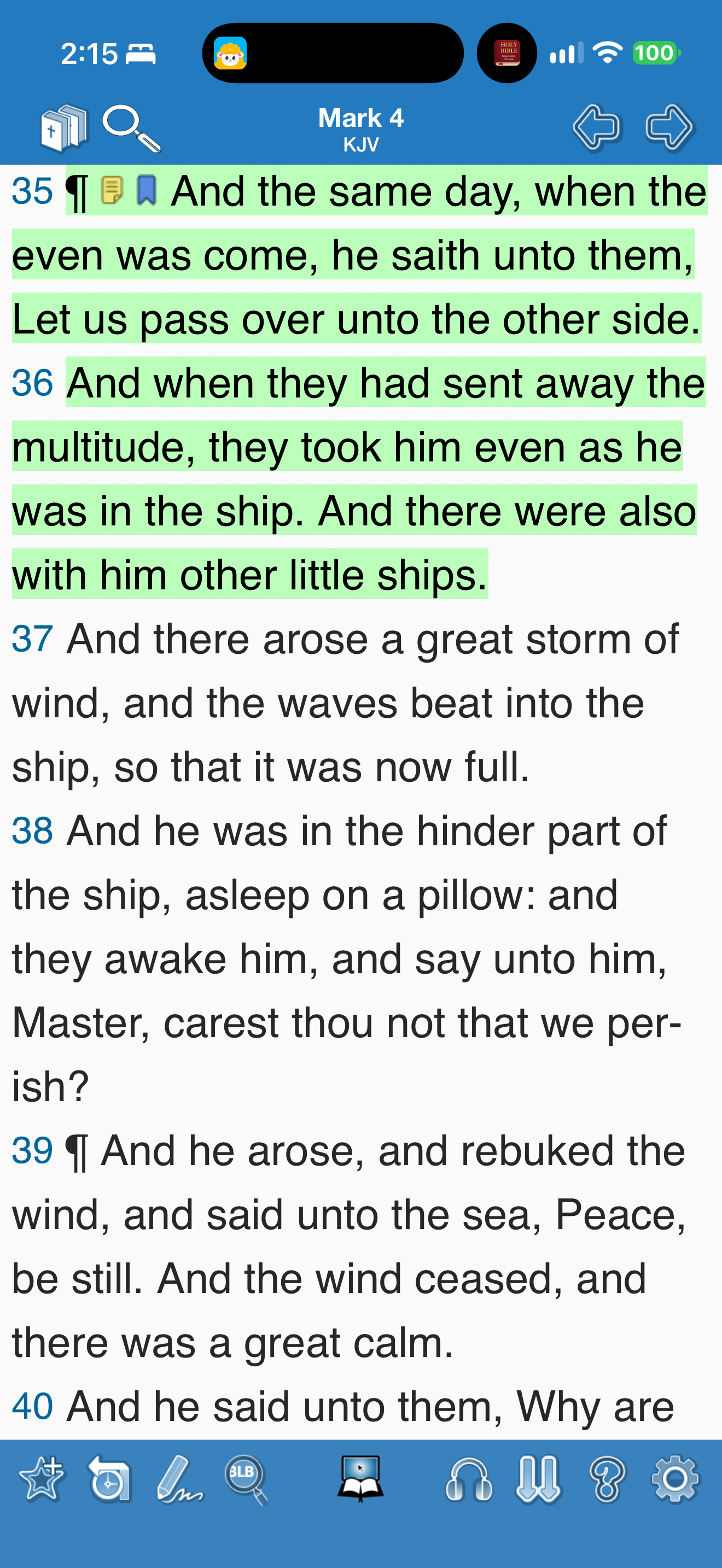
What this shows
Blue Letter Bible uses separate note and bookmark icons beside highlighted verses.
Capture context
The neutral research annotations were removed after capture. The frame shows appearance, not tap behavior.
Captured for interface research. Screen behavior may change between app versions.
Selected text visible in this screen
Interface labels transcribed during review.
Mark 4; KJV; verse numbers 35 and 36; note icon; bookmark icon; green highlight.
Patterns about this screen
The design decisions this screen shows, with the options and research behind each.
- Highlights and notes
How should readers mark a passage? · Reading the Bible
Explore this screen
- Screen type
- Bible reader
- Components
- Content groupIcon buttonNavigation bar
- Patterns / features
- HighlightNoteBookmarkEditorial cues
- User tasks
- Read ScriptureMark & save
- Interface states
- Not specified
Component details
Inline annotation · Icon button · Navigation bar
Original descriptive labels
Browsing uses consistent groups. The original reviewed labels stay searchable; they can describe settings, context or capture details rather than a user task or interface state.
- Screen description
- Bible reader
- Task descriptions
- Read Scripture · Mark and save
- State and context descriptions
- Default
- Feature descriptions
- Highlight · Note · Bookmark · Verse numbers
In a captured sequence
Selected capture sequence; not a complete walkthrough.