

A resource guide below the passage
Olive Tree Bible · 13 October 2026 · Version 8.1.3
What this shows
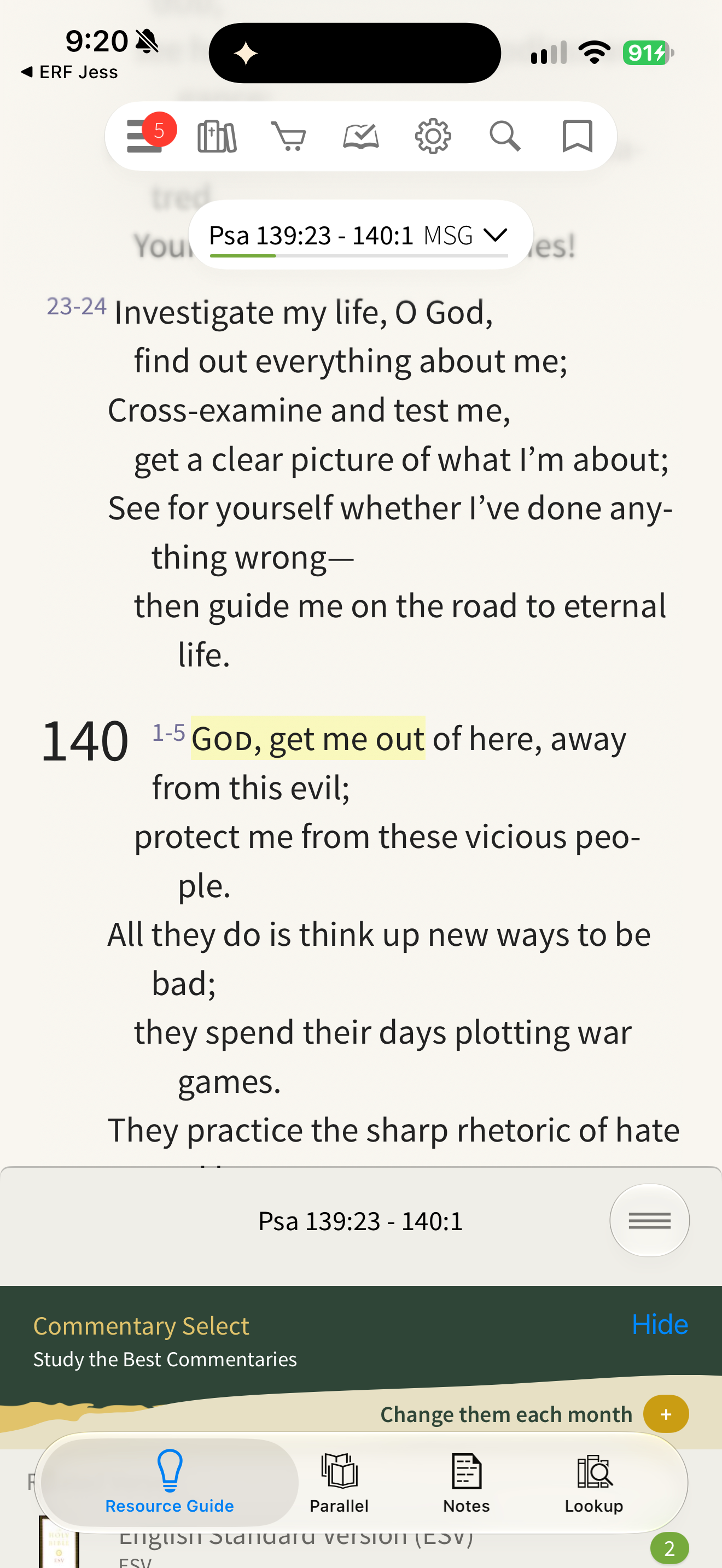
Olive Tree opens its Resource Guide beneath the Scripture reader.
Capture context
The lower panel includes a promotional commentary banner. A pre-existing Scripture highlight remains above; no private note or custom category is visible.
Captured for interface research. Screen behavior may change between app versions.
Selected text visible in this screen
Interface labels transcribed during review.
Psa 139:23 - 140:1 MSG; Psa 139:23 - 140:1; Commentary Select; Study the Best Commentaries; Hide; Change them each month; Resource Guide; Parallel; Notes; Lookup; English Standard Version (ESV).
Patterns about this screen
The design decisions this screen shows, with the options and research behind each.
- Study helps
Where should commentary and notes open? · Reading the Bible
Explore this screen
- Screen type
- Bible reader
- Components
- Content groupTabsCardIcon button
- Patterns / features
- Translation
- User tasks
- Read ScriptureStudy a passage
- Interface states
- Not specified
Component details
Split panel · Tabs · Card · Icon button
Original descriptive labels
Browsing uses consistent groups. The original reviewed labels stay searchable; they can describe settings, context or capture details rather than a user task or interface state.
- Screen description
- Bible reader
- Task descriptions
- Read Scripture · Study a passage
- State and context descriptions
- Default
- Feature descriptions
- Translation